Lifetime licence · free demo for every board · questions: arslan.ziya@gmail.com
Tutorial videosPricing

handBoard7 21 video lessons

Handball scoreboard software tutorials

handBoard7 is the handball scoreboard software for LED displays, projectors and TV graphics. These 21 lessons, 2 h 5 min in all, go through the program page by page: pick a lesson below and it plays here. The videos have no narration; on-screen captions explain each step.

  • 21 lessons
  • 2 h 5 min of video
  • On-screen captions

Main Window (Title bar, menu strip, display modes and design gallery)

Match control

handBoard7 Tutorial 01.06 - Rules and Period Settings (Presets, Cumulative Time and timeouts)5:57

01.06 Rules and Period Settings (Presets, Cumulative Time and timeouts)

How to set the playing rules in handBoard7: the Period & Penalty Settings window with the presets Handball, U19 and U16, the period lengths and texts, the suspension buttons, Cumulative Time and the team timeout. We save U16 with Cumulative Time, hide the timeout area, try Cancel and then restore the factory Handball values.

Chapters
  1. The settings window
  2. Periods and suspension buttons
  3. Clock and timeout
  4. U16 with Cumulative Time
  5. Cancel and timeout off
  6. Back to Handball
handBoard7 Tutorial 01.07 - Teams, Logos and Tool Icons (Names, text lines, layers, NDI, keyboard)5:50

01.07 Teams, Logos and Tool Icons (Names, text lines, layers, NDI, keyboard)

The rest of the handBoard7 Game page: team names, the two text lines with date and time placeholders, the logos, the background video and the middle image, NDI output, the keyboard shortcuts and the shortcuts to the Language and Remote Control settings. User guide chapters 5.8, 12, 13, 15 and 16.

Chapters
  1. Team names
  2. Text lines
  3. Logos
  4. Background layers and NDI
  5. Keyboard shortcuts
  6. Language and remote control

Media player

Info screens and match graphics

Statistics

Sponsored, advertisement and chroma key modes

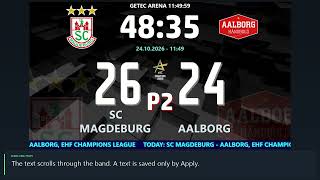
handBoard7 Tutorial 05.01 - Sponsored Mode (Sponsor logos, scrolling texts and the band settings)6:12

05.01 Sponsored Mode (Sponsor logos, scrolling texts and the band settings)

Sponsored mode in handBoard7: the scoreboard with a sponsor band below or above it. The band shows an endless row of sponsor logos or one of four scrolling texts. How to switch to the mode, fill the band, change its style, font and colours, and set its location and height.

Chapters
  1. Switching to Sp
  2. Sponsor logos and the list
  3. Logo style
  4. Scrolling texts
  5. Text style, font and colours
  6. Location and height
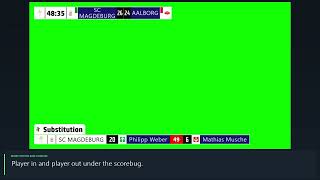
handBoard7 Tutorial 05.03 - Chroma Key Mode (A keyed scorebug and lower thirds for a video mixer)8:03

05.03 Chroma Key Mode (A keyed scorebug and lower thirds for a video mixer)

Chroma Key mode in handBoard7: a compact scorebug and lower thirds on a plain key colour, ready to be keyed over the live picture by a vision mixer or streaming software. The CK page: scorebug, Goal, card, 2-minute and Substitution lower thirds, the match timeline, clips, camera and screen capture behind the graphics, and the key colours.

Chapters
  1. The scorebug
  2. Goal lower third
  3. 2 minutes and cards
  4. Substitution and timeline
  5. Media, camera and capture
  6. Key colour

Settings, design editor and remote control

Try handBoard7 free

Follow the lessons on your own PC. The demo has every feature and shows only a small DEMO watermark.

Tutorials for other sports